You’ve arrived at the moment where your project is getting serious and you need to begin coding some serious backend. This guide will get you started.
Goal of Backend Restructure#
Goal of the development project is to get the backend to look like this:
- Backend architecture:
- Index.js
- App.js
- Routers:
- Streams Router
- Trades Router
- User Router
- Login Router
- Models
- Trades Model
- Streams Model
- User Model
- Utils
- Middleware
- Logger
- config.js
- Tests
- setting up test environment
Laying the groundworks#
Step 1: Take stock of current project dependencies and structure#
Examine package.json to see what dependencies it currently have. Examine the project folder structure and files to check where is the backend mostly stored. For a simple express server, it is possible that all the routes, middleware, models, are stored in index.js.
This is the state of my project before I decided to add robustness to it.
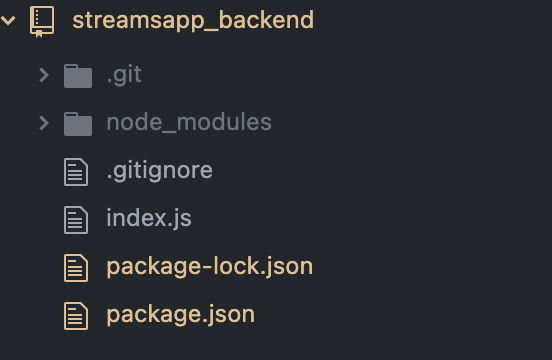
My index.js was simply:
 1
 2
 3
 4
 5
 6
 7
 8
 9
10
11
12
13
14
15
16
17
18
19
20
21
22
23
24
25
26
27
28
29
| const express = require('express')
const app = express()
const cors = require('cors')
app.use(cors())
const trades = [
...
]
const streams = [
...
]
app.get('/', (request, response) => {
response.send('<h1>Hello World!</h1>')
})
app.get('/api/streams', (request, response) => {
response.json(streams)
})
app.get('/api/trades', (request, response) => {
response.json(trades)
})
const PORT = 3001
app.listen(PORT, () => {
console.log(`Server running on port ${PORT}`)
})
|
There are three get routes, and the data is stored in variables within the index.js file. There’s no ways of altering the data via post.
These are my dependencies in my package.json file:
1
2
3
4
5
6
7
| "dependencies": {
"cors": "^2.8.5",
"express": "^4.17.1"
},
"devDependencies": {
"nodemon": "^2.0.12"
}
|
As you can see, pretty bare bones. Time to beef it up!
Step 2: Install morgan for dev console logging#
npm install morganvar morgan = require('morgan') within index.js (for now)app.use(morgan('tiny'))
- (Optional) If you want to customize your morgan message, you could do it like so:
1
2
| morgan.token('data', (req, res) => JSON.stringify(req.body))
app.use(morgan(':method :url :response-time :data'))
|
This would display the response data: e.g.
POST /api/persons 6.638 {"name":"Ar22to Hellas","number":"040-123456"}
Step 3: Set up Eslint.#
npm install eslint --save-dev- Initialize eslint with
node_modules/.bin/eslint --init
Follow this as reference:
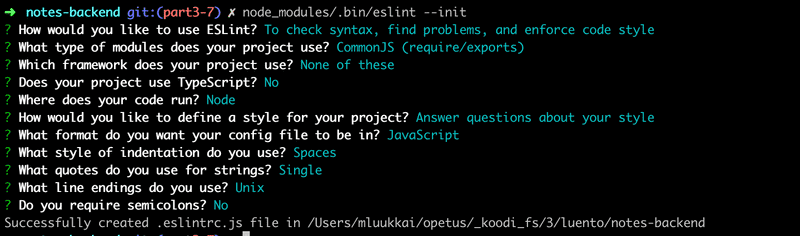
- Enable command
npm lint
1
2
3
4
5
6
7
| {
"scripts": {
"start": "node index.js",
"dev": "nodemon index.js",
"lint": "eslint ."
},
}
|
Restructuring the project#
There are no right ways to move forward with the next step. For this case, I’ve decided to begin with constructing the models for my app.
Step 4: Creating models#
- Create a new folder
models - Create your first model. This case,
trade.js. - Coding the model
- a mongoose model basically consists of:
- a schema where you define the fields and data types
new mongoose.Schema({}) - any validator you want to perform on it (e.g.
userSchema.plugin(uniqueValidator)) - display transformation
userSchema.set('toJSON') - model creation
mongoose.model('User', userSchema) - exporting
Example of User model:
1
2
3
4
5
6
7
8
9
10
11
12
13
14
15
16
17
18
19
20
21
22
23
24
25
26
27
28
29
30
31
32
33
34
| const mongoose = require('mongoose')
const uniqueValidator = require('mongoose-unique-validator')
const userSchema = new mongoose.Schema({
username: {
type: String,
unique: true
},
name: String,
passwordHash: String,
notes: [
{
type: mongoose.Schema.Types.ObjectId,
ref: 'Note'
}
],
})
userSchema.plugin(uniqueValidator)
userSchema.set('toJSON', {
transform: (document, returnedObject) => {
returnedObject.id = returnedObject._id.toString()
delete returnedObject._id
delete returnedObject.__v
// the passwordHash should not be revealed
delete returnedObject.passwordHash
}
})
const User = mongoose.model('User', userSchema)
module.exports = User
|
Step 5: Create logger.js file in utils#
/utils/logger.js
1
2
3
4
5
6
7
8
9
10
11
12
13
14
15
16
| const info = (...params) => {
if (process.env.NODE_ENV !== 'test') {
console.log(...params)
}
}
const error = (...params) => {
if (process.env.NODE_ENV !== 'test') {
console.error(...params)
}
}
module.exports = {
info, error
}
|
Step 6: Creating app.js#
Distribute the responsibility between index.js and app.js.
index.js should import app.js, and has a simple job of opening a port to listen.
Index.js
1
2
3
4
5
6
7
8
| const app = require('./app')
const cors = require('cors')
app.use(cors())
const PORT = 3003
app.listen(PORT, () => {
console.log(`Server running on port ${PORT}`)
})
|
App.js contains the main app; i.e. database connection.
app.js
1
2
3
4
5
6
7
8
9
10
11
12
13
14
15
16
17
18
19
20
21
22
| const config = require('./utils/config')
const logger = require('./utils/logger')
const express = require('express')
const app = express()
const mongoose = require('mongoose')
var morgan = require('morgan')
logger.info('connecting to')
mongoose.connect(config.MONGODB_URI)
.then(() => {
logger.info('connected to MongoDB')
})
.catch((error) => {
logger.error('error connecting to MongoDB:', error.message)
})
morgan.token('data', (req, res) => JSON.stringify(req.body))
app.use(morgan(':method :url :response-time :data'))
module.exports = app
|
Step 7: Connecting to Database#
The connection to database is typically done in App.js.
But before you begin the connection, it’s good to set the config variables.
npm install dotenv- Create .env file in project root
- Add the following properties to to .env:
MONGODB_URI=’'
PORT=3003
- Add .env to .gitignore.
- Create new file
utils/config.js
1
2
3
4
5
6
7
8
9
10
11
12
13
| //config.js
require('dotenv').config()
const PORT = process.env.PORT || 3003
const MONGODB_URI = process.env.NODE_ENV === 'test'
? process.env.TEST_MONGODB_URI
: process.env.MONGODB_URI
module.exports = {
MONGODB_URI,
PORT
}
|
If process is underlined by eslint, go to eslintrc and change env from 'browser': true to 'node': true.
6.
The following lines in App.js are in charge of connection:
1
2
3
4
5
6
7
8
9
10
11
12
13
| const config = require('./utils/config')
const logger = require('./utils/logger')
const mongoose = require('mongoose')
logger.info('connecting to')
mongoose.connect(config.MONGODB_URI)
.then(() => {
logger.info('connected to MongoDB')
})
.catch((error) => {
logger.error('error connecting to MongoDB:', error.message)
})
|
Step 8: Test that the connection works#
npm run dev
If it’s connected, it should display connected to MongoDB on console.
Step 9: Populating the database with some initial sample data#
- Under utils, create a document sampleData.js containing your sample data and export them.
Store your data as a list of collections like so:
1
2
3
4
5
6
7
8
9
10
11
12
| const tradeData = [
{
email: "user1@domain.com",
password: "user1",
posts: []
},
{
email: "user2@domain.com",
password: "user2",
posts: []
},
]
|
Import into app.js
const tradesData = require('./utils/sampleData').tradesData
Import models into app.js
const Trade = require('./models/trade.js')
const Stream = require('./models/stream.js')
Drop collections in case they already exist:
1
2
3
4
5
6
7
8
9
10
11
12
13
14
15
16
17
18
19
| mongoose.connection.dropCollection('trades', (err) => {
if (err) {
if (err.code === 26)
console.log("-- trades collection does not exist")
else throw err;
} else {
console.log('-- trades collection dropped')
}
})
mongoose.connection.dropCollection('streams', (err) => {
if (err) {
if (err.code === 26)
console.log("-- streams collection does not exist")
else throw err;
} else {
console.log('-- streams collection dropped')
}
})
|
- To add them to mongo database,
Within app.js:
1
2
3
4
5
6
7
8
9
| Trade.create(tradesData, (err, trades) => {
if (err) throw err
console.log(trades + '\n-- trades inserted successfully')
})
Stream.create(streamsData, (err, streams) => {
if (err) throw err
console.log(streams + '\n-- streams inserted successfully')
})
|
- However, in reality, there was a complication in terms of ID management. The gist of it is that, my Streams collection needs to reference the Trade _id field, which are not created yet.
My (inelegant) workaround:
- Bulk create trades data like above by running
npm run dev - Stop app - to prevent constant writing into DB.
- Copy _id manually into streams sample data
- Comment out create trades lines; Run bulk create streams.
It works.The full app.js looks like this - comment out as per necessary. These are just one off executions for development purposes, so it’s fine.
 1
 2
 3
 4
 5
 6
 7
 8
 9
10
11
12
13
14
15
16
17
18
19
20
21
22
23
24
25
26
27
28
29
30
31
32
33
34
35
36
37
38
39
40
41
42
43
44
45
46
47
48
49
50
51
52
53
54
55
56
57
58
59
60
61
| const config = require('./utils/config')
const express = require('express')
const tradesData = require('./utils/sampleData').tradesData
const streamsData = require('./utils/sampleData').streamsData
const Trade = require('./models/trade.js')
const Stream = require('./models/stream.js')
const app = express()
const logger = require('./utils/logger')
const mongoose = require('mongoose')
var morgan = require('morgan')
console.log(tradesData)
logger.info('connecting to')
mongoose.connect(config.MONGODB_URI)
.then(() => {
logger.info('connected to MongoDB')
})
.catch((error) => {
logger.error('error connecting to MongoDB:', error.message)
})
morgan.token('data', (req, res) => JSON.stringify(req.body))
app.use(morgan(':method :url :response-time :data'))
//**********************************************************
//* Clearing collection
//**********************************************************
mongoose.connection.dropCollection('trades', (err) => {
if (err) {
if (err.code === 26)
console.log('-- trades collection does not exist')
else throw err
} else {
console.log('-- trades collection dropped')
}
})
mongoose.connection.dropCollection('streams', (err) => {
if (err) {
if (err.code === 26)
console.log('-- streams collection does not exist')
else throw err
} else {
console.log('-- streams collection dropped')
}
})
//**********************************************************
//* Populating trades
//**********************************************************
Stream.create(streamsData, (err, streams) => {
if (err) throw err
console.log(streams + '\n--streams inserted successfully')
})
Trade.create(tradesData, (err, trades) => {
if (err) throw err
console.log(trades + '\n-- trades inserted successfully')
})
module.exports = app
|
That’s it for this part, it’s getting bit long. Onwards to Part B, where I discuss what else I do after that!